
Loyalty program for internet service providers (ISPs): how to turn on-time payments and renewals into points
Reward on-time payments, renewals, and upgrades with points in the Hubsoft Customer App.

What is a loyalty program for internet service providers (ISPs)?
It is an incentive system in which subscribers earn points for actions that matter to the provider and exchange those points for benefits tied to the internet service itself. Unlike a commercial discount applied across the entire customer base, a points program rewards only those who already demonstrate the desired behavior.
In the broadband market, where options are plentiful and switching providers is easy, this model helps ISPs retain subscribers without reducing the list price. The reward is tied to revenue that has already been collected, and the accumulated balance gives customers a concrete reason to stay.
Why customer loyalty impacts ISP performance
Reducing the monthly fee to retain a customer erodes margins across the entire customer base, while the cost of acquiring a new subscriber remains high. Every additional month of retention increases LTV (the value a subscriber generates over the course of the relationship) and spreads out the cost you incurred to acquire them.
A loyalty program addresses this exact challenge. You reward those who pay on time, remain in your customer base, and expand their contract. There is also a relationship benefit: when subscribers open the app to check their balance or redeem a benefit, the app is no longer just a place to access a duplicate bank slip (boleto); it becomes a recurring touchpoint with your brand.
How Loyalty works in the Hubsoft Customer App
The program follows a four-step cycle, all recorded in the subscriber's statement:
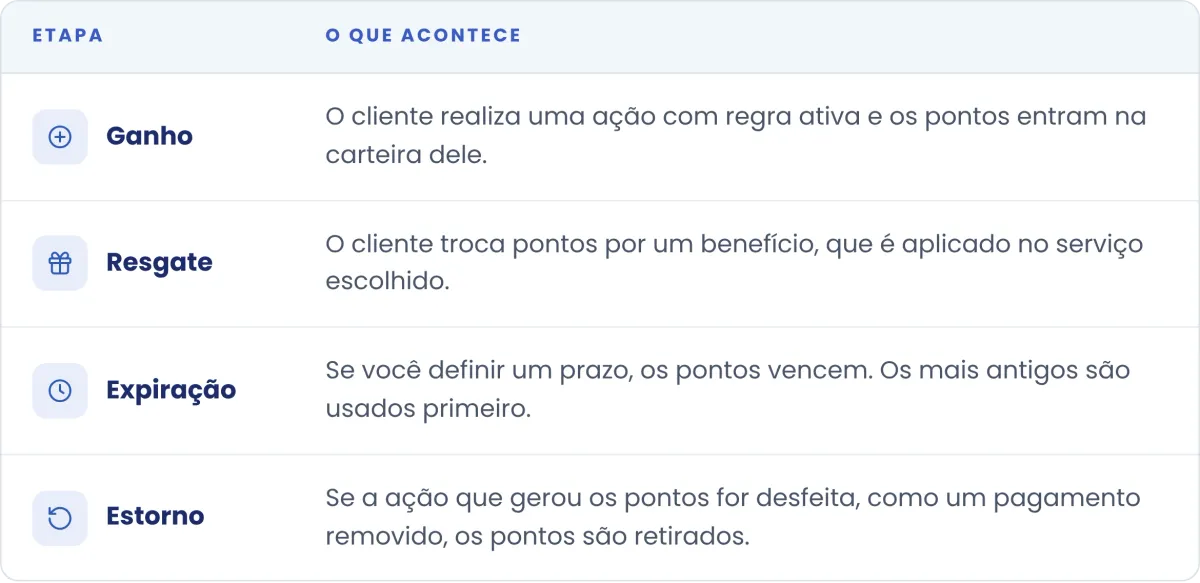
The system processes points in the background, with no manual intervention from your team.
What subscribers see in the app
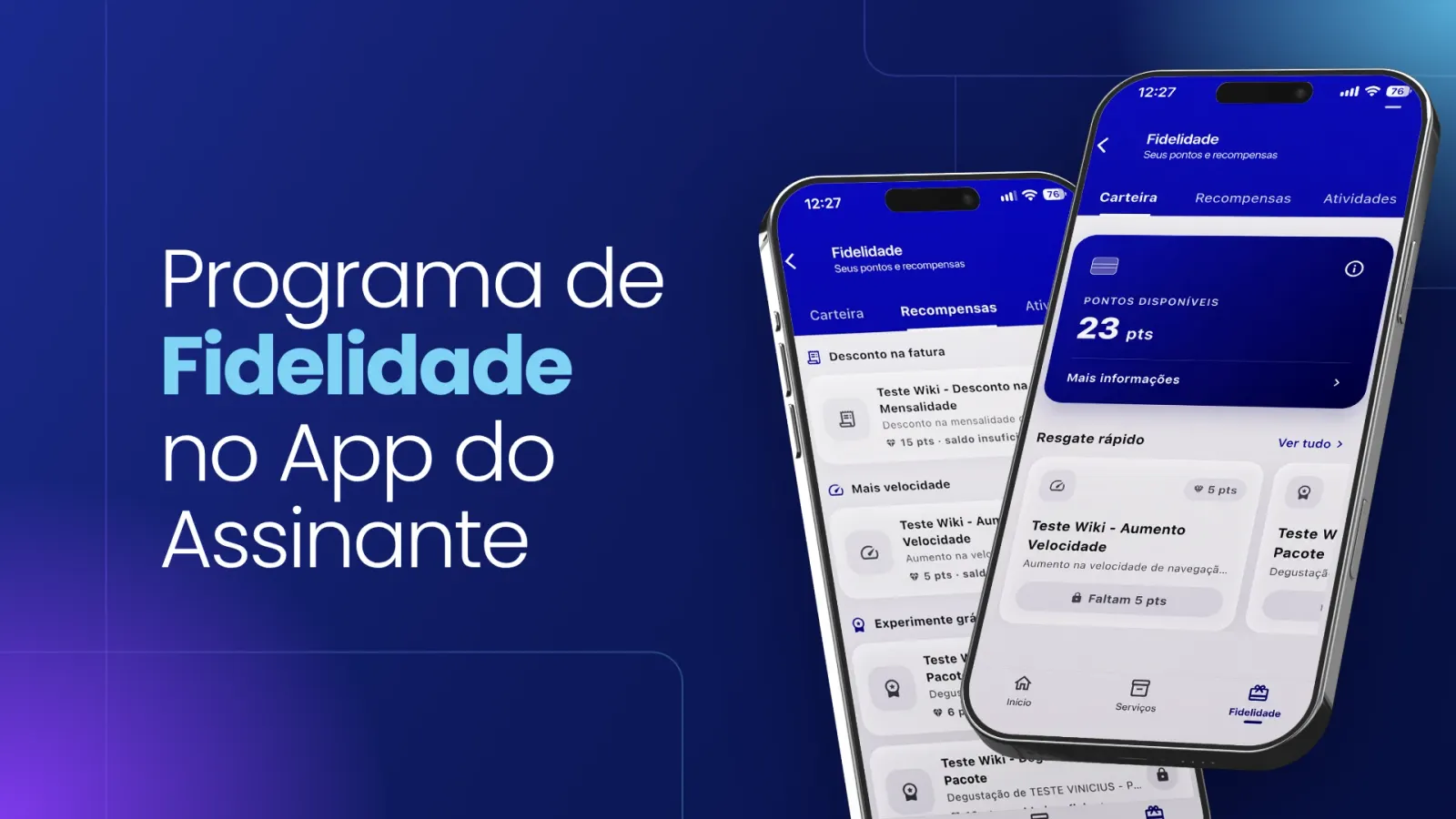
With the program active, the app's bottom menu displays the Loyalty, next to Home and Services. The Your points and rewards screen has three tabs:
- Wallet: available points balance and a carousel of Quick redemption options for benefits already covered by the current balance.
- Rewards: all active benefits, grouped into Bill discount, More speed and Try it free. Items beyond the subscriber's balance appear with a lock, and the Can redeem filter shows only what the customer can already exchange their points for.
- Activities: the complete statement, with earnings in green and spending in red, plus search and filters.
See every program screen, step by step, in the Loyalty Program Wiki.
7 actions that generate points and the metric each one impacts
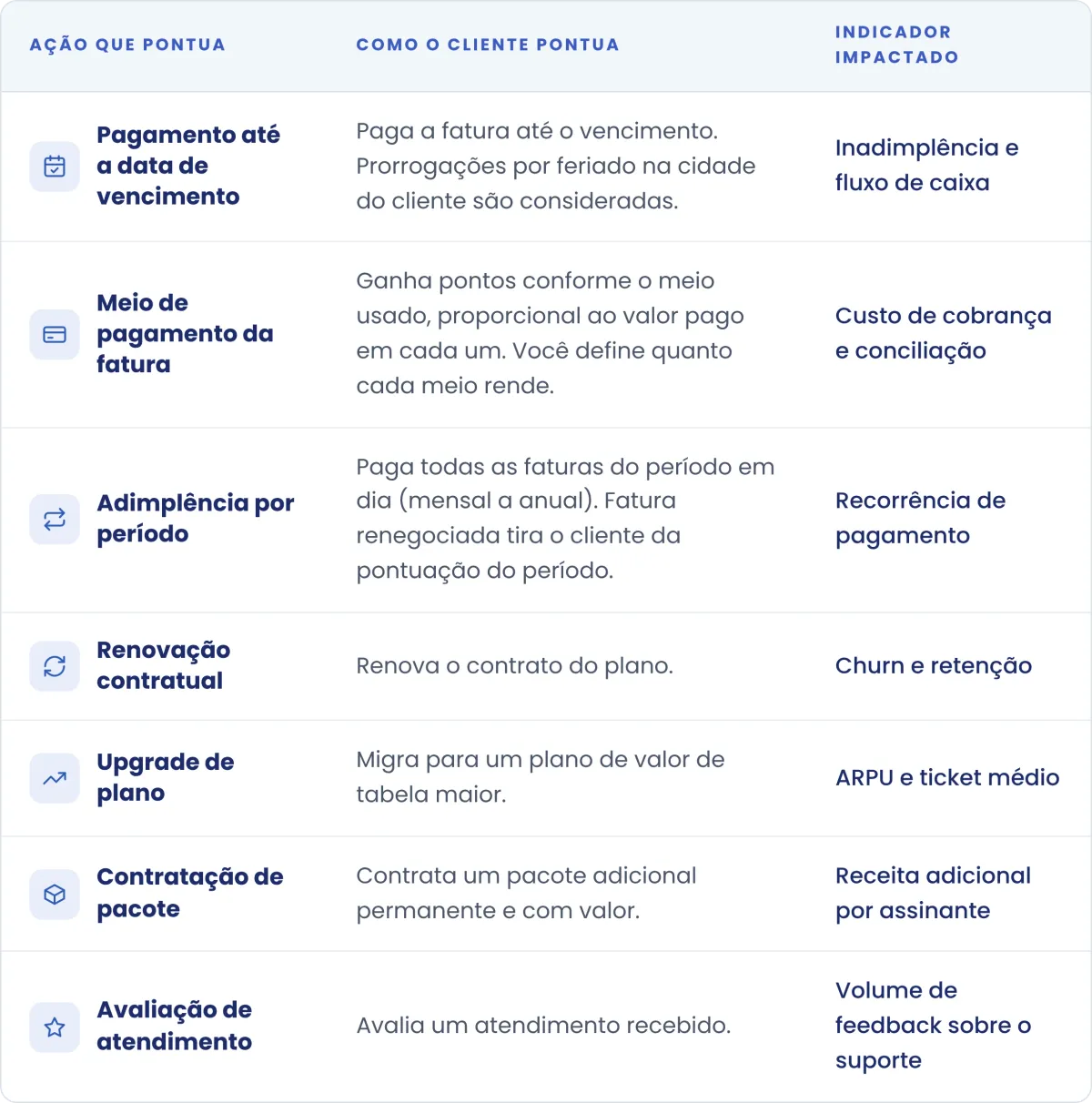
You choose which actions earn points, how much each one is worth, the maximum frequency (once per day, once per month, or one time only), and the rule's validity period. The payment method rule deserves special attention. It allows you to assign more points to methods with lower operational collection costs, guiding subscribers without imposing anything.
Learn more: the conditions for each rule, such as frequency limits and payment consistency rules over a period, are detailed in the Loyalty Wiki, "How customers earn points" section.
Rewards with controlled operational costs
The three benefit types deliver high perceived value with a predictable impact on your operations.
- Package trials: The package is activated immediately on the selected service for the number of days you define. At the end of the period, access ends automatically. In practice, a trial works as a product test: the subscriber tries an additional service before deciding whether to purchase it. You can restrict it, for example, to one trial per customer.
- Increased speed: The service speed increases immediately for the duration of the benefit and automatically returns to normal when the period ends. In addition to being a tangible reward, the benefit shows customers what the experience would be like on a higher-tier plan.
- Bill discount: The discount is applied to the monthly charge starting with the next bill for the selected service, according to the promotion rules. It is granted only to those who accumulated points through payment-consistent behavior.
Management benefits for the provider
- Retention tied to the contract cycle: By assigning points to contract renewals and payment consistency over a period, you create a concrete reason for subscribers to remain in your customer base. The accumulated balance has value for them, and that value can only be realized while the contract is active.
- Less delinquency and more predictable cash flow: Paying on time starts to earn more than just avoiding a late fee. Because points are credited only when payment is confirmed and posted to the bill, the incentive is always tied to revenue actually received.
- Higher LTV through experience-driven upselling: Package trials and temporary speed increases put subscribers in contact with higher-value products. Combined with rules that award points for upgrades and package purchases, these rewards create an upsell funnel within the app itself, increasing the average ticket and the customer base's LTV.
Want to see how Loyalty fits into your provider's retention goals? Talk to a Hubsoft specialist here.
Financially controlled points liability
Accumulated points represent a future commitment for your operation. Loyalty provides mechanisms to keep this liability from growing unchecked:
- Configurable expiration from 1 day to 10 years, counted from the date each point is earned. Without a defined period, points do not expire.
- Oldest points used first with each redemption.
- Automatic push notifications before expiration, by default at 90, 60, and 30 days, with up to five configurable milestones. The reminder also encourages redemption and return to the app.
- Automatic reversal when an invoice that generated points is no longer paid. If the customer has already used those points, the balance becomes negative and new redemptions are blocked until the customer earns points again.
Learn how expiration, reversals, and negative balances work in the Loyalty Wiki.
Governance and auditing
For internet service providers (ISPs) with mature control processes, traceability is a requirement. In Loyalty:
- Every transaction (earning, redemption, expiration, and reversal) is immutable and recorded in the statement.
- The Loyalty Audit consolidates transactions, pending items, configuration changes, and transmitted redemptions. A transmitted redemption that fails returns the points to the customer.
- The Overview tab shows points in circulation, redemption rate, and program expiration.
- The customer record displays the balance, total earned, and total spent, speeding up support service.
- Changes to rules and benefits apply only to future earnings and redemptions. Anything already credited or redeemed does not change.
Secure, frictionless redemption for the subscriber
Redemption has four steps: choose the benefit, select the service that will receive it, review the summary (current balance, cost, and balance after redemption), and press and hold the Hold to redeem button. This final step prevents accidental tap redemptions and, consequently, support requests to undo transactions.
Canceled services and statuses you marked as ineligible do not appear in the selection. If redemption cannot be completed due to insufficient balance, a benefit with pending configuration, or an ineligible service, no points are deducted.
How to activate the loyalty program with your internet service provider (ISP)
The program is available in the Customer App starting with version 2.3.0, and related updates are included in Hubsoft update 1.122. For it to appear and work for the subscriber, three conditions must be met:
- Enable the Display Loyalty option in the Customer App Configuration tab.
- Create at least one active points-earning rule.
- Create at least one active benefit with complete configuration.
Rules and benefits are located under Customer App > Loyalty > Rules and Benefits.
Already using Hubsoft? Follow the activation step-by-step guide in the Loyalty Wiki and launch the program for your customer base.
Best practices for designing a points program
- Start with a few rules. On-time payments and contract renewals cover the two most sensitive indicators for most ISPs.
- Calculate the cost of each reward. Set the points cost for each benefit based on its actual impact on margin and network capacity.
- Set an expiration period from the start. Adjusting expiration later, after the customer base is already engaged, creates more friction than starting with a clear period.
- Monitor the Overview. A very low redemption rate may indicate that rewards are not attractive enough or that their points cost is too high.
A well-designed loyalty program rewards the customers who sustain your revenue, increases the LTV of your customer base, and turns the app into an active relationship channel. With Loyalty, you define the rules, control your points liability, and track every transaction with full traceability.