Process automation and fleet management for internet service providers
See how automation and fleet management solve the main operational bottlenecks faced by internet service providers, with Hubinar examples.


Automation and fleet management are two of the main operational challenges for growing ISPs. At Hubsoft Hubinar, the development team showed live how these two problems are solved directly within the ERP—without parallel systems, spreadsheets, or reliance on manual intervention.
In this article, you will find:
- What Dynamic Automation is and how it works at an internet service provider
- How HubFrota centralizes fleet management in the ERP
- Practical cases demonstrated live at Hubsoft Hubinar
- Technical questions and answers from the development team
- Complete FAQ about both modules
This article brings together everything presented: the automation and fleet management modules, practical cases, questions answered live, and what each feature delivers in the reality of a medium-sized or large ISP.
The problem that led to both modules
Before presenting the solutions, the Hubsoft team clearly defined the problem:
How many processes at your ISP still depend on someone remembering to do something?
- Overdue invoice: someone needs to remember to contact the customer.
- Scheduled work order: someone needs to notify the technician and open the internal task.
- Vehicle heading into the field: someone needs to record, control, and track its return.
In smaller operations, this is manageable. However, at medium-sized and large ISPs, this model creates a silent risk that grows along with the customer base. That is why the two modules presented at Hubinar—automation and fleet management—address these two areas directly.
What is process automation for internet service providers?
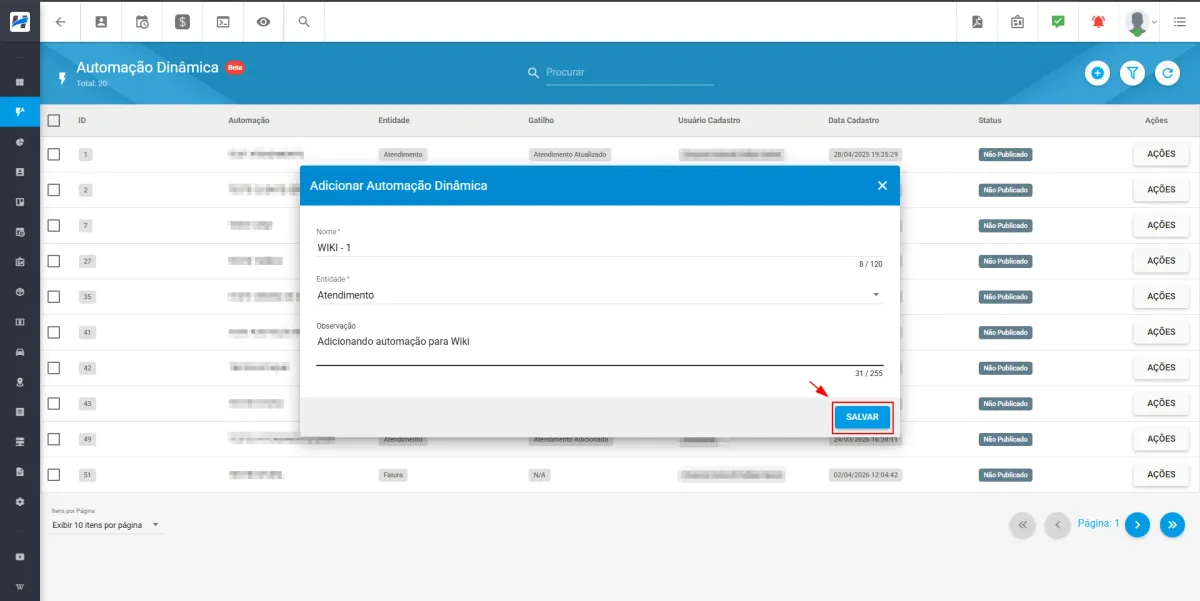
Dynamic Automation is the Hubsoft module that lets you create customized workflows executed automatically based on events already occurring in the operation. In other words, the system acts on its own while the manager monitors it.
The module’s logic is structured around three elements:
- Trigger: the event that starts the workflow. Examples: scheduling a work order, an invoice becoming due, or a customer entering renegotiation.
- Condition: the filter that determines whether the workflow should be executed. Multiple conditions can be combined with comparison operators, making triggers precise and aligned with each ISP’s business rules.
- Action: what the system executes automatically. Notifications, opening support requests, creating tasks, and changing statuses.
The module covers the main operational entities of an ISP: Support, Invoice, Work Order, CRM, Tasks, Renegotiation, and Inventory Movement.
Dynamic Automation in practice: two scenarios demonstrated live
Example 1 — Work Order Automation
One of the most common examples at ISPs is a scheduled work order that requires three actions at once: notifying the customer, coordinating with the technician, and creating an internal task for follow-up.
In most cases, each of these actions depends on manual execution. In addition, in high-volume operations, at least one of them is often forgotten.
At Hubinar, the team demonstrated how to configure a complete workflow for this scenario:
- Trigger: work order scheduling
- Condition: none applied—the rule applies to any scheduled work order
- Chained actions: automatic customer notification + task creation for the internal team
As soon as the appointment is recorded, the workflow triggers. The customer receives confirmation in real time. As a result, the team already finds the task created before any internal coordination is needed. The entire process is recorded with the date, time, and actions performed.
00:04:43 Practical Presentation Video | Example 1
Example 2 — Automatic Collection Sequence for Overdue Invoices
Delinquency does not wait. However, collection sequences that depend on manual processes wait for the meeting, the support spike, or the busy week.
The second practical case demonstrated the configuration of a scheduled collection routine. The system runs automatically at the defined time every day. It scans the invoice database, identifies overdue invoices according to the configured criteria—customer group, customer type, and days overdue—and opens a support request for each linked service.
In short, the practical result is straightforward: collection runs every day, at the right time, regardless of who is available. The team arrives to find support requests created, organized, and ready for follow-up.
00:07:10 Practical Presentation Video | Example 2
Traceability: the manager remains in control
One essential point highlighted during the presentation: automating without tracking simply replaces one problem with another.
That is why every automation published in Hubsoft generates a complete execution record. In the system header, the manager accesses the automation queue and views each trigger executed, with filters for entity, date, time, validated conditions, and actions performed.
This solves two practical problems:
- Complete traceability in operations that need to provide accountability, either internally or during audits.
- Precise diagnosis: when a workflow does not work as expected, the manager identifies exactly where it stopped without contacting support.
Want to see how the automation queue works in practice? Talk to a Hubsoft specialist.
What HubFrota is and why it was developed
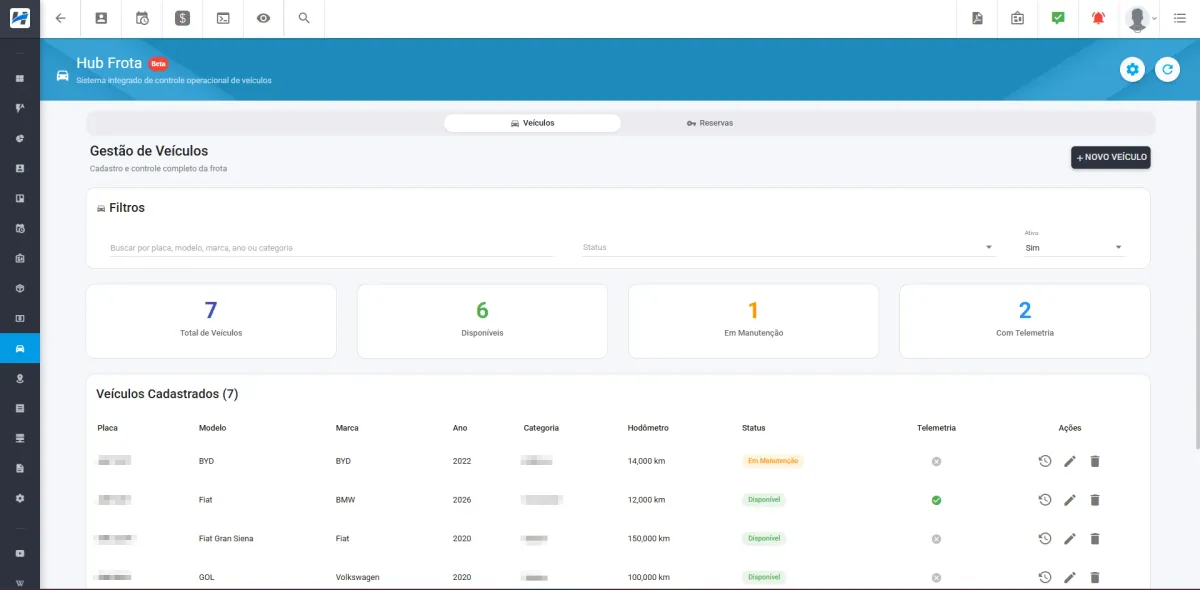
HubFrota is Hubsoft’s fleet management module, developed to centralize vehicle control directly in the ERP—without spreadsheets, parallel notes, or external apps disconnected from the operation.
The reality that led to the module is familiar to anyone who manages field technical teams: fleets controlled in Excel spreadsheets, notes in the storeroom, no real visibility into which vehicles are available, no mileage control, and no traceability for fueling.
In response to this scenario, HubFrota addresses these issues with three core features demonstrated live.
HubFrota in practice: the scenarios presented at Hubinar
Structured fleet inventory
Each vehicle record includes license plate, make, category, color, fuel type, chassis, model, year, status, mileage, serial number, and telemetry support with hour-meter tracking for vehicles that use this type of control.
In the list, the manager filters by status (available, under maintenance, reserved), searches by license plate, model, make, year, or category, and accesses the history, fueling records, and accounts payable linked to each unit.
This makes the database searchable in real time and replaces any parallel tracking system.
00:17:50 Practical Presentation Video
Vehicle reservation, checkout, and return with a complete cycle
HubFrota documents the complete usage cycle for each vehicle.
Upon checkout: the technician selects the available vehicle, enters the purpose, checkout mileage, expected return time, fuel level, and passengers, and can attach files. The reservation moves to the “Reservations in Use” tab.
Upon return: return mileage, fuel level, gallons refueled, refueling cost, and location are recorded. The system then allows you to automatically generate an accounts payable entry in the finance module.
00:19:54 Practical Presentation Video
It is worth highlighting an important operational point: while a vehicle has the "Reserved" status, it does not appear as an option for a new reservation. This eliminates scheduling conflicts between technicians.
Does your operation still rely on spreadsheets to manage your fleet? Talk to a Hubsoft specialist.
Features in development: dashboard, refueling, and maintenance
During Hubinar, the team also presented a preview of the features in development:
- Operational dashboard: real-time fleet charts and metrics — availability, monthly maintenance costs, and other management indicators.
- Refueling management: manual entry or bulk import via spreadsheet, with automatic generation of an accounts payable entry in the finance module.
- Maintenance management: preventive and corrective maintenance registration, with date, mileage, and cost tracking, plus automatic generation of an accounts payable entry and a complete history for each vehicle.
00:22:16 Practical Presentation Video
FAQ — Frequently Asked Questions About Dynamic Automation
During Hubinar, we compiled some of the main questions submitted by providers about the new automation and fleet management modules. Check out the answers.
FAQ — Frequently Asked Questions About HubFrota
Automation and fleet management in your ISP's day-to-day operations
In short, process automation and fleet management for internet service providers (ISPs) are no longer competitive differentiators. For ISPs operating at scale, they are operational requirements.
The Hubsoft Hubinar demonstrated, with a live demo, how these two modules work within the ERP—with no parallel systems, no manual processes, and complete traceability.
Therefore, if you want to understand how Dynamic Automation and HubFrota would work within the specific reality of your operation, the Hubsoft team is available for a technical conversation.
Hubsoft Wiki
📖 Access the complete Dynamic Automation documentation
📖 Access the complete HubFrota documentation
YouTube