HubIA, the native artificial intelligence of Hubsoft's ERP
HubIA is Hubsoft’s native AI: it queries and takes action across support, work orders, network, and finance, with more than 270 actions and no changes without confirmation.


A blocked customer calls asking for their internet service not to be disconnected until the payment date. A technician says they will not be working and leaves the day's route uncovered. The manager needs to understand churn trends before the meeting. In all these cases, the information is already in the ERP. What takes time is finding, cross-referencing, and acting on it.
A HubIA is the native artificial intelligence of Hubsoft, created to shorten this path. The team makes requests in natural language, directly within the system screens, and HubIA queries, explains, and executes, always requiring confirmation before changing any data.
You ask. Hubsoft takes care of it.
In this article, you’ll see what HubIA does in an internet service provider’s daily operations, how it works, and how managers stay in control of the AI.
AI has arrived in the provider’s operations
For a long time, artificial intelligence in telecom was the domain of large carriers, with dedicated data teams and lengthy projects. For most regional providers, it felt far removed from daily operations.
Language models have changed that landscape. Today, AI understands a request written the way the team speaks and turns it into queries and actions in the system. Tasks that once required opening three screens, applying filters, and building reports can now be handled in a conversation.
The benefit becomes clear when this AI is inside the ERP: with access to the operation’s real data, the actions the system already performs, and the permission rules the team already uses. That is HubIA’s starting point.
What is HubIA
HubIA is Hubsoft’s artificial intelligence module, built for the ERP specialized in internet service providers (ISPs). It is available directly on the system screens through a button in the top bar and works as an assistant that queries and executes tasks across the operation.
In numbers:
- More than 270 actions that the AI can use in Hubsoft, from support to the network and from finance to tax operations;
- 7 ready-made agents to clone and tailor to the provider’s reality;
- No data changes happen without a person’s confirmation.
Why did Hubsoft develop a native AI?
Provider teams spend much of their day on repetitive lookup and operational tasks: locating a customer’s invoices, checking signal and history before responding to a ticket, building technicians’ schedules, and gathering management metrics. Added together, these tasks consume hours of operational time.
Generic AI tools do not solve this problem because they cannot see the provider’s data. Copying information from the ERP into an external chat creates security risks and does not scale for an entire team.
HubIA was developed to solve this pain point within the system itself: HubIA works with the operation’s real data, acts on behalf of the person it is chatting with, respects the permissions already defined for each user, and only uses actions authorized by the administrator.
How HubIA works in practice:
It understands the screen you’re on.
The chat opens beside the screen the person is already using, without switching tabs. HubIA knows which screen and record the user is working with. That is why requests such as "summarize this customer" or "what still needs to be resolved in this support case" work without requiring a code or name.
Reactive mode: the team asks, and the AI queries
In reactive mode, the user types in the chat and the response appears while HubIA works. Each query made to the system appears as an "Executed" badge in real time, making it clear where each piece of information came from.
Examples of requests:
- "Which support cases are awaiting analysis?"
- "Which invoices for this customer are outstanding?"
- "Build tomorrow’s visit schedule, grouped by neighborhood."
- "Show me the churn for the last six months."
Proactive mode: the AI alerts you before you ask
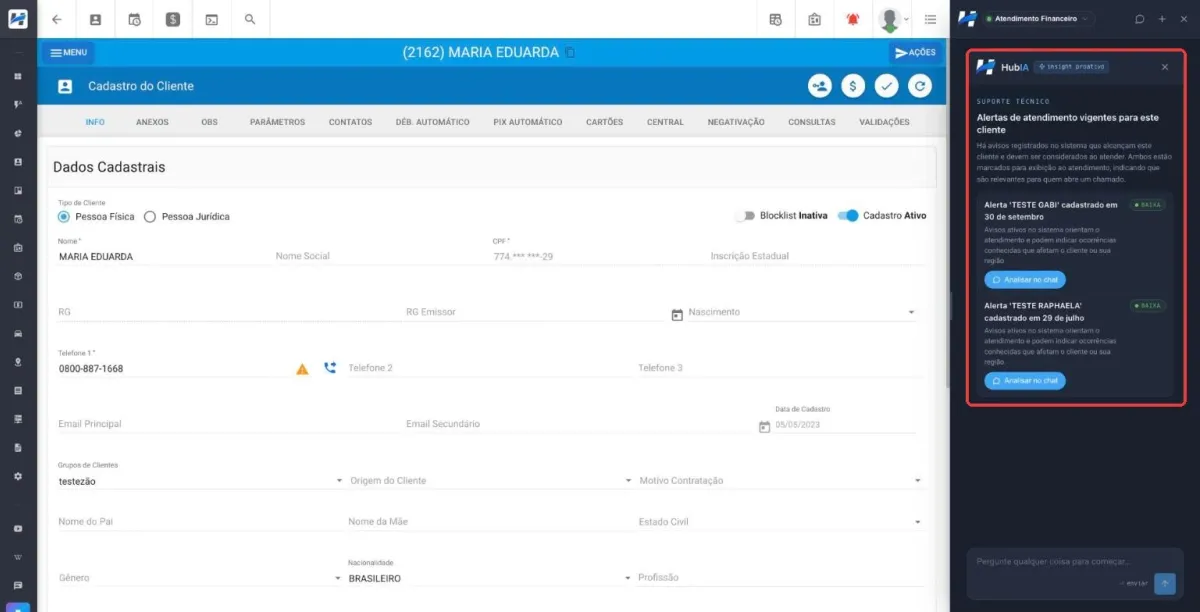
In proactive mode, HubIA analyzes the record as soon as the screen opens. When opening a customer’s profile, for example, it checks overdue invoices, active alerts in the area, and contracts nearing the end of their loyalty period. When something relevant is found, a blue dot appears on the HubIA button. One click opens the alert, and each item can be explored further with "Analyze in chat."
The proactive insight only queries data. It never changes data.
Actions always require confirmation
When a request changes data in Hubsoft, HubIA displays a confirmation card with the action and the completed data, then waits for the user’s decision:
- Confirm and execute: the action is performed in Hubsoft under the requesting user’s identity;
- Cancel: nothing is changed.
Queries are immediate. Changes always depend on a person.
Smart provider management starts in the ERP
HubIA is the result of what Hubsoft has been building over the years. As the central hub of the provider’s operations, Hubsoft brings together data, automated processes, and security in one place. Artificial intelligence is the next step in this evolution: it uses this information to query, explain, and execute tasks, always within each user’s permissions.
See HubIA live at the October 20 Hubinar
On October 20 (Tuesday), at 10 a.m., the Hubsoft team will present HubIA live on the Hubsoft Brasil channel. The final part of the Hubinar is reserved for questions, answered live.
Watch at:

Prefer to see HubIA with your provider’s real-world context?
Talk to the Hubsoft team and schedule a no-obligation conversation.