Reports
Complete reports for internet service providers
The Hubsoft Reports module is the Hubsoft ERP feature that generates ready-to-use reports for internet service providers (ISPs) on customers, services, connections, contracts, inventory, support, finances, invoices, and telephony. Each report has customizable filters, lets you choose the columns displayed, exports to Excel and PDF, and lets you apply bulk actions—such as cancellations, service migrations, and billing changes—directly from the results.

Highlights
- Complete financial overview, down to the D.R.E.
- Revenue protected against registration errors
- Contracts and cancellations under control
- Network, inventory, and equipment tracked
Reports capabilities
-
Ready-to-use reports for every ISP department
Customers, network, contracts, inventory, support, finances, invoices, and telephony. Everything is ready to view, with no need to build spreadsheets or request data extracts from support.
-
Customizable filters and column selection
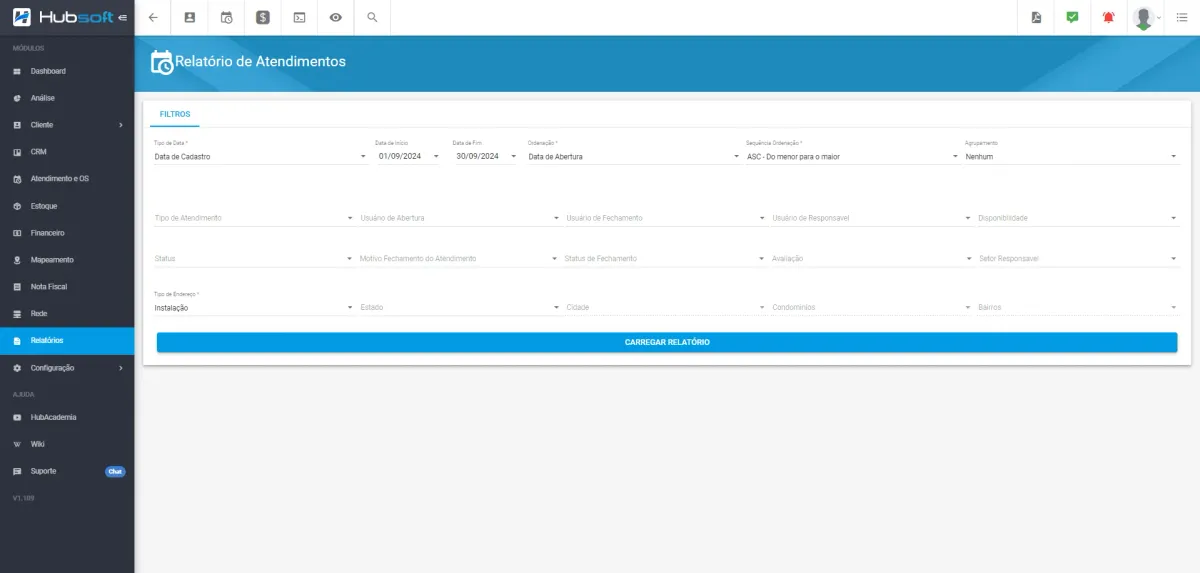
Define the parameters for each report and select only the columns that matter. Each department can create the view that makes sense for its daily operations.
-
Excel and PDF exports with an export queue
Export to Excel to analyze the data or to PDF to share it. Larger files are processed in the queue, while you continue working in the system.
-
Bulk actions applied directly from the report
Filtered the right records? Send communications, migrate services, change billing, or cancel in bulk—all at once, without opening each customer individually.
An internet service provider (ISP) that grows generates data all the time: customers, connections, contracts, inventory, support requests, invoices, and tax documents. The challenge is turning all of it into decisions. The Hubsoft Reports module brings this information together in one place, with ready-to-use reports for every area of the operation.
Filter exactly what you need, choose the columns you want to see, and export to Excel or PDF in just a few clicks. And you can do more than view the data: directly from the report, apply bulk actions such as migrating services, changing billing, sending communications, or canceling in bulk, without opening each customer individually.
From the Management D.R.E. to the inventory Kardex, from contracts nearing expiration to services without billing, Hubsoft helps your ISP see what is happening, find what needs attention, and act quickly.
Frequently asked questions
What reports does Hubsoft offer for internet service providers?
Hubsoft has reports for every area of the internet service provider (ISP): monitoring (Connection Alerts, Connection Statement, Service Logs), customers (Customers, Customer Services, Packages, Prospects), contracts (Expired / Expiring Contracts), infrastructure and inventory (IP Allocation, Assets, Minimum Inventory, Kardex), support (Support Requests, Work Orders), finances (Accounts Payable, Accounts Receivable, Management D.R.E., Invoices), tax documents (NF 21 and 22, NFe 55, NFSe), telephony (MVNOs, STFCs), and service cancellations.
Can Hubsoft reports be exported?
Yes. All Hubsoft reports can be exported to Excel or PDF. Exports are processed in an export queue, and users can continue working in the system while the file is generated.
Can reports be customized in Hubsoft?
Yes. In Hubsoft, each report has its own filters, which users complete before loading the data. Through the settings icon, users can also choose which columns appear, creating a specific view for each department.
What are bulk actions in Hubsoft reports?
Bulk actions are changes applied at once to multiple records filtered in a Hubsoft report. With them, the internet service provider (ISP) can send communications, migrate services, change billing, associate packages, cancel services in bulk, and link contracts without editing customers one by one.
Does Hubsoft have a D.R.E. report for internet service providers?
Yes. Hubsoft has the Management D.R.E. report and the Financial Statement, which give the internet service provider (ISP) an overview of the operation's results, along with the Accounts Payable, Accounts Receivable, Invoices, and Billing Events reports.
Other Hubsoft modules
-
Support and Work Orders
Manage support requests and work orders with complete control, protocol generation, technician scheduling, and work order execution through the app.
-
Finance
Manage accounts payable, financial transactions, and automated monthly billing, with a detailed view of remittances, returns, and payments received.
-
Mapping
Map your network with real-time geolocation, FTTH documentation, technician tracking, and advanced customization of map elements.
-
CRM
Manage relationships with potential customers in a customizable CRM, with labels, cards, permissions and conversion of prospects into customers.
-
Customers
Centralize each customer’s information on one integrated screen, including plans, financial details, services, work orders, and linked equipment.
-
Electronic Invoices
Issue telecom invoices, NFCom, product NF-e and service NFS-e automatically, integrated with Sefaz and city tax systems.
-
Networks
Document and manage your network with IP control, integration with concentrators and OLTs, a data usage dashboard, and Point of Presence registration.
-
Inventory
Manage your inventory with precision: inventory locations, movements, receipt via supplier NF-e XML, physical counts, and purchase requests.
-
Dashboards & Analytics
Monitor your provider with clear dashboards, support charts and custom reports and dashboards powered by the built-in Metabase.
-
Tasks
Manage, categorize and automate tasks to streamline workflows and keep track of your team’s activities.